Switching to a new video player on WordPress sounds simple until you look at an older website.
Adding a video player to one new post is easy. You can install a plugin, add its Gutenberg block, paste a shortcode, and publish the page.
But what happens when your website already has hundreds or thousands of videos?
This is where things become complicated.
Imagine a website that has published videos for several years. Those videos may appear inside regular posts, pages, tutorials, product pages, or custom post types. Updating every post manually would take hours, and possibly days.
For many site owners, that makes changing video players feel almost impossible.
Fortunately, there is a better approach. Instead of editing every post, you can automatically replace or enhance existing videos across your WordPress website.
Get Entronn Player Plugin for WordPress
The Problem With Manually Replacing WordPress Videos
WordPress has supported video embedding for years. You can use the built-in [ video ] shortcode or add videos through the editor. WordPress then renders the video using its native player.
That works perfectly fine for a small website.
The problem starts when you want something different.
Maybe you want:
- A more modern player design
- HLS streaming support
- Resume playback
- Better mobile controls
- Video advertisements
- More customization
Many WordPress video plugins require you to insert a new shortcode or block for every video. Some also require creating a player preset before embedding it.
That approach works well for new content. It becomes much less convenient when your website already has a large video library.
Let’s say you have:
- 2,000 published articles
- 1,500 videos
- Videos spread across multiple post types
Replacing every video manually is not a realistic migration plan.
Why Automatic Video Replacement Makes More Sense
A better approach is to leave the original post content alone.
Instead of opening every article and replacing this:
<video src="video.mp4"></video>
with a new shortcode or block, a plugin can detect supported videos when the page is rendered.
It can then enhance or replace the player automatically.
This changes the migration process completely.
You install the plugin, configure how it should behave, and existing videos can start using the new player without editing thousands of old posts.
The biggest advantage is that your content does not need to be rewritten.
Your original video URLs remain where they already are.
Your posts remain unchanged.
You are simply changing how those videos are presented to visitors.
For larger websites, this can save a significant amount of manual work.
Automatically Replace Existing Videos With Entronn Player
This is the main problem I wanted to solve with Entronn Player.
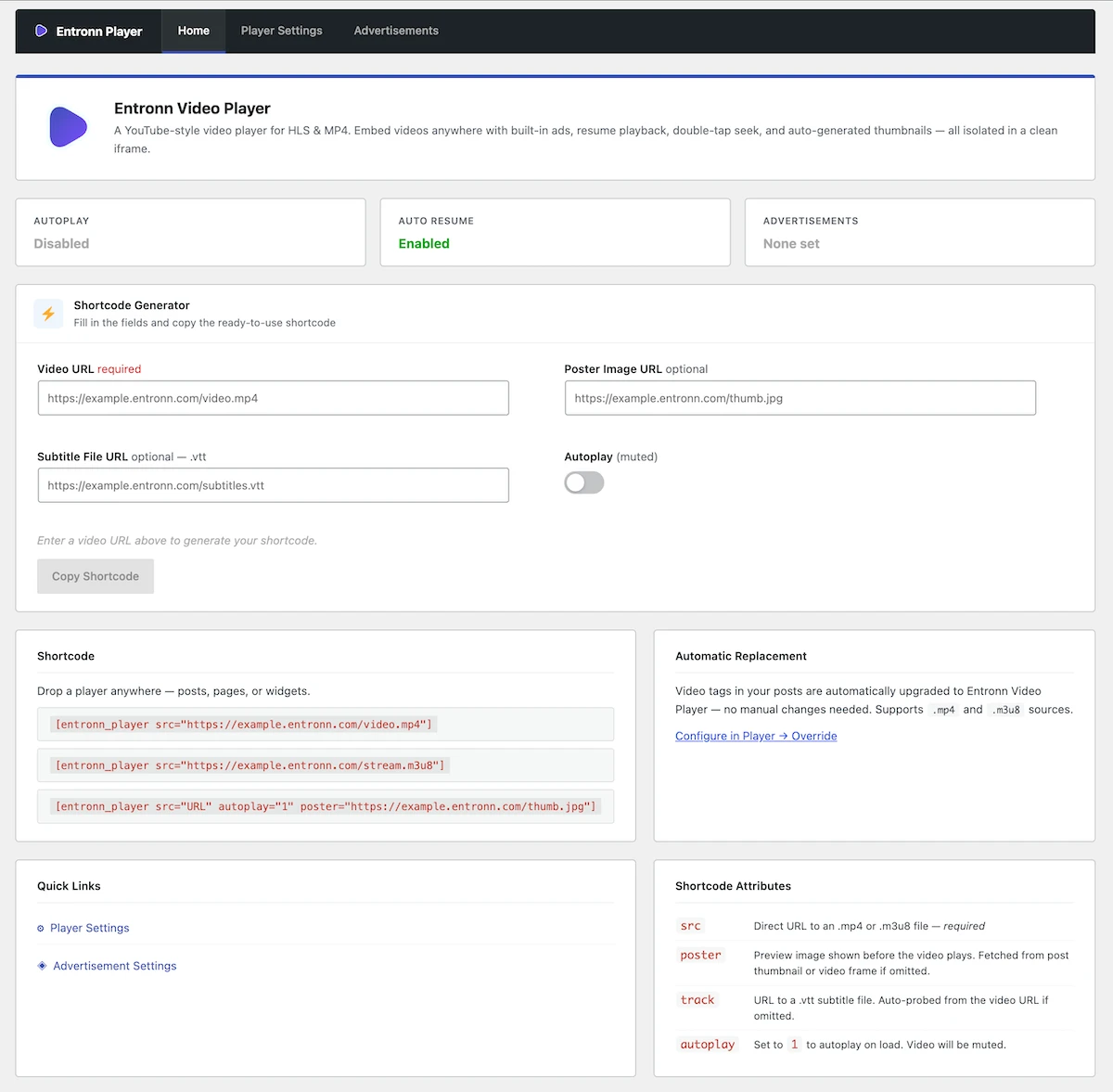
Entronn Player can automatically detect supported video elements and WordPress [ video ] shortcodes in post content and upgrade them to the Entronn Player.
That means a website with an existing library of videos does not need to replace every video manually.
You can continue using your existing content structure.
Entronn Player currently supports:
- MP4 videos
- HLS
.m3u8streams - Existing
<video>tags - WordPress
[ video ]shortcodes - Gutenberg blocks
- Manual shortcodes for new videos
The automatic replacement feature is particularly useful for websites that already have a large amount of published content.
For example, a news website may have videos inside hundreds of articles. A tutorial website may have videos spread across different custom post types. An entertainment website may have years of older posts containing self-hosted MP4 files.
Editing each post is unnecessary when the player can work with the videos already there.
MP4 and HLS Support
Another important part of a modern WordPress video setup is format support.
MP4 remains one of the most common formats for self-hosted videos.
HLS is also useful for streaming because it can support adaptive playback through .m3u8 playlists.
Entronn Player supports both MP4 and HLS.
This means you can use a direct MP4 file for simple videos or use an HLS stream when your video infrastructure supports it.
The video files themselves can remain hosted wherever you already host them.
For example:
- Your own server
- A CDN
- Amazon S3
- Cloudflare R2
- Another publicly accessible video source
Entronn Player does not require you to move your existing videos into a new hosting platform.
That is important because changing hosting and changing players are two completely different projects.
You should not need to do both at the same time.
What Happens to Your Existing Posts?
One of the biggest concerns when changing a plugin is what happens if you later deactivate it.
A good automatic replacement system should avoid permanently rewriting thousands of posts.
Your original content should remain intact.
That means your existing video tags and WordPress video content can continue to exist in the database as they originally did.
The player enhancement happens when the page is displayed.
This approach makes testing much easier too.
You can enable automatic replacement and check how your existing content looks. If you find compatibility issues, you can adjust the settings without having to undo changes across hundreds of posts.
For a website with a large content library, that is much safer than running a one-time migration script that permanently edits old posts.
What About Videos Outside Post Content?
Not every WordPress website uses videos in the same way.
Some themes render video elements directly.
Some page builders generate their own output.
Some plugins add videos dynamically.
Entronn Player includes an optional site-wide replacement mode for situations where you want to replace matching video tags beyond normal post content.
However, this should be used carefully.
Site-wide replacement can affect videos generated by themes and other parts of your website. It is best to test it first, especially on a complex WordPress installation.
For most websites, starting with videos inside normal post content is the safer option.
Automatic Replacement Does Not Remove Manual Controls
Automatic replacement is useful for existing content, but manual embedding still has its place.
For example, you may want a specific player configuration for a new article.
You may want to insert a video into a landing page.
You may also need a custom poster image or a different setup for a particular video.
Entronn Player includes a Gutenberg block and shortcode options for those situations.
So the idea is not to force every video into one workflow.
Instead, you can use automatic replacement for existing videos and blocks or shortcodes for new and custom video embeds.
That gives you a practical way to manage both old and new content.
A Better Option for Websites With Large Video Libraries
The biggest benefit of automatic video replacement is simple: it removes the migration problem.
A website owner should not have to choose between keeping an old player forever or spending days editing old posts.
If your site already contains hundreds or thousands of videos, the ability to upgrade them without changing every post can make a new video player much easier to adopt.
That is the approach behind Entronn Player.
Install the plugin, configure automatic replacement, and supported existing videos can use the new player without rewriting your content library.
You can also use MP4 and HLS sources, add new videos through Gutenberg or shortcodes, and configure the player from the WordPress dashboard.
For new websites, manual embedding is easy.
For older websites with a large archive, automatic replacement can be the feature that makes switching players practical.
Entronn Player is available for free on WordPress.org.